Accessing Minerva
Need help? Select one of the following tabs, or refer to the troubleshooting section below.
Students
Current students must refer to the 2FA information provided on the IT Website. Former students who did not complete a degree should refer to the "Other Users" tab.
Alumni
For Alumni who do not have two-factor authorization yet, they can use the password reset via the McGill Alumni office.
McGill Alumni Association
Email: info.alumni [at] mcgill.ca
Tel.: 514-398-5000
Toll-free in North America: 1-800-567-5175
Other Users
"Other Users" include former students (including IUT and exchange students), postdoctoral fellows and research trainees, newly-admitted students and guests. Staff must contact Human Resources for assistance.
1. I do not remember or never received my McGill ID number.
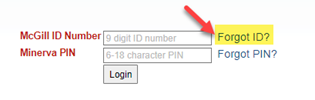
On the Minerva login page click Forgot ID.
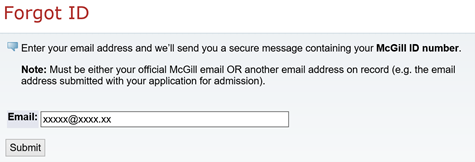
On the Forgot ID page, enter the email address, it must be the same email address that was specified on your application to McGill University.
You will receive an email from McGill with your ID number. Remember to check your trash and spam folders for this email from McGill IT.
2. You know your McGill ID number but do not know your PIN
On the Minerva login page, enter your ID number and click on Forgot PIN.

Answer your security questions or click on Forgot Answer to have a new PIN sent to you by email.
Still having trouble?
You can fill out this form to obtain your Minerva login information.
Troubleshooting Tips
My PIN was reset, but every time I enter a new PIN I receive the message “PIN has expired”
This means that the new PIN you tried to create did not conform with the PIN rules. Your Minerva PIN is a combination of 6-to-18 numbers and letters of your choosing. Please try again, ensuring you follow the rules exactly.
I'm receiving a "You're not authorized to access Minerva" error message
If you have applied to McGill in the past but never enrolled in courses, you will have to submit a new application via the web application rather than through Minerva.
I don’t remember my login credentials to access Minerva
You can access Minerva using either your McGill username and password or your McGill ID number and PIN. Your McGill ID was emailed to you when you originally applied to McGill. If your McGill ID is a 7-digit number, simply use the same ID but add “11” to the beginning.
Still having trouble?
You can fill out this form to obtain your Minerva login information.